The 7 most common cover mistakes (and how to fix them)
Updated on August 10, 2026 · 6 min read
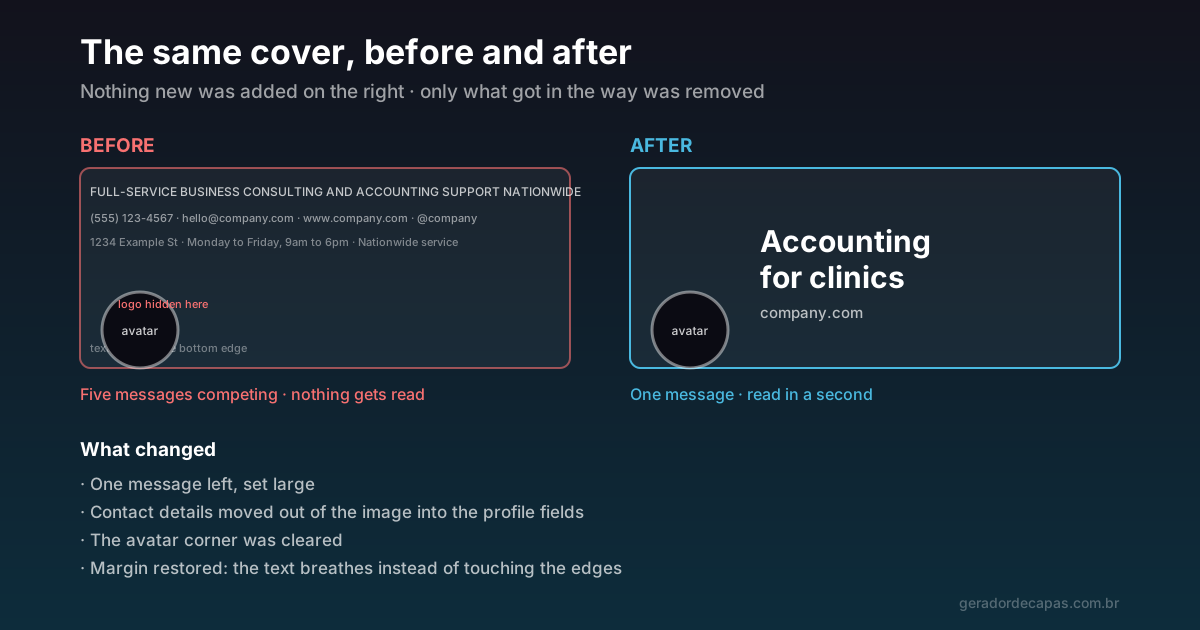
Amateur covers nearly always fail at the same points. The good news is that all seven mistakes below have a simple fix, and none requires starting over — most of the time the solution is to remove something, not to add.
1. Text that is too small
Why it happens: the cover is created and judged on a large screen, where everything looks comfortable.
The problem: most people will see that image in a band a few centimetres wide on a phone. What looked restrained becomes unreadable.
The fix: enlarge the main text until it looks too big on desktop. It is probably about right on mobile. As a reference, the main message should occupy at least a tenth of the cover height.
2. Information at the edges
Why it happens: the file shows the whole image, so it seems the whole image is displayed.
The problem: several networks crop the sides on smaller screens. On Facebook, about 90 px from each side disappear in the app.
The fix: treat the edges as decoration. Everything that must be read goes to the centre. Check each network safe area before positioning text.
3. An element hidden behind the profile photo
Why it happens: the bottom-left corner looks like a good spot for the logo.
The problem: that is exactly where the avatar sits, on practically every network. The logo shows up half-covered.
The fix: leave that corner empty, always. And consider that the avatar is usually the logo already — repeating it on the cover rarely adds anything.
4. Too much information
Why it happens: the feeling that if the space is large, not filling it is a waste.
The problem: phone, email, website, address, opening hours and a tagline in one image produce exactly zero reading. When everything is important, nothing is.
The fix: one message per cover. Contact details belong in the profile fields, where they are clickable — inside an image, nobody types them out.
5. A stretched or pixelated image
Why it happens: reusing a photo that was not at the right ratio, or taking a small image and enlarging it.
The problem: distortion and blur are the most noticeable flaws there are. Both communicate carelessness instantly.
The fix: always start from the official size or a multiple of it. If the available photo is small or has an incompatible ratio, change photos — stretching never works.
6. Insufficient contrast
Why it happens: colours chosen for harmony, without checking legibility.
The problem: light text on a light background (or dark on dark) disappears on dim screens, in sunlight, or for anyone with low vision.
The fix: prioritise difference in lightness, not just hue. If you use a background photo, darken the text region. And run the squint test: blurred, and the text vanished? Contrast is missing.
7. A cover disconnected from the brand
Why it happens: each cover is created in isolation, at a different moment, with no reference to the previous ones.
The problem: profiles with different palettes and typefaces on each network look like different companies. That weakens recognition, which is exactly what the cover should be building.
The fix: fix one palette and one type family and repeat them everywhere. The guide on consistent visual identity covers how to set that standard.
An eighth, quieter mistake
There is one mistake that does not appear in the image: leaving the cover up too long. A finished promotion, an event that already happened, a tagline from an earlier phase of the company. That kind of cover communicates something worse than an ugly cover — it communicates neglect.
If the cover announces something with a deadline, put the swap date in your calendar the same day you publish it.
Before and after: what changes in practice
The diagram at the top of this page shows both extremes with the same starting content. On the left, a consulting cover with five blocks of information: a long tagline in small type, phone, email, website, handle, address and opening hours. Technically it is all there. In practice, none of it is read.
On the right, the same company with a decision made: "Accounting for clinics". Two lines in large type, the website at a discreet size, the avatar corner clear and margin all around. No new element was created — only the ones getting in the way were removed, and what remained gained the room to be read.
It is counter-intuitive, but almost every cover fix follows that path: the gain comes from subtraction.
How to audit your current covers in ten minutes
If you already have published profiles, a quick diagnosis is worth running before redoing anything:
- Open each profile on a phone, not on desktop. Half the problems only show up there.
- Screenshot each one and place the images side by side. Inconsistencies in colour and typeface become obvious when seen together.
- Read each cover in two seconds, timed. Whatever you could not absorb in that window, a visitor will not absorb either.
- Mark which ones fail each item on the checklist below. There is usually a pattern: whoever gets type size wrong on one network gets it wrong on the others.
- Start with the most visited network. If time is short, fixing one cover well beats fixing four badly.
Correction checklist
- Is the main text large enough for mobile?
- Is everything that matters in the centre?
- Is the bottom-left corner clear?
- Is there only one message?
- Is the image at its original ratio, unstretched?
- Does the text survive the squint test?
- Are the colours and typefaces the same as on your other networks?
- If there is a deadline, have you already scheduled the swap?
Running that list takes under two minutes and solves most problems before they go public.
Frequently asked questions
What is the most common mistake on social media covers?
Too much information. Phone, email, website, address and a tagline in one image mean nothing gets read. A cover communicates one message well.
Why did my text disappear from the cover on mobile?
It was probably near the side edges. Several networks crop the sides on smaller screens — on Facebook, about 90 px from each side. The fix is to move everything that must be read to the centre.
Can I put my phone and email on the cover?
You can, but it returns little: a contact inside an image is not clickable and almost nobody types it out. Use the profile fields and reserve the cover for saying what you do.
How do I know if my colours have enough contrast?
Squint until the image blurs, or shrink it considerably on screen. If the main text disappears, the difference in lightness is insufficient — no choice of hue will fix that.
How often should I change the cover?
Visual identity covers can stay indefinitely. Campaign covers need an expiry date set at the moment of publishing, because an expired promotion left up makes a profile look abandoned.
My cover came out blurry. How do I fix it?
Blur almost always comes from enlargement: the image was created smaller than the official size and the network stretched it to fill. There is no after-the-fact fix — it has to be rebuilt from the correct size or a multiple of it. If the source photo is small, change the photo instead of enlarging it.
Is it worth hiring a designer for a cover?
It depends on the role it plays. For an institutional cover that will stay up for months and represents the brand, a professional adds value. For campaigns that change often, the cost rarely justifies itself: hierarchy, contrast, breathing room and coherence solve most cases with a simple tool.
Redo your cover without these mistakes
Free, no sign-up, high-resolution download.