10 design tips for covers that convert
Updated on August 10, 2026 · 6 min read
A well-designed cover builds trust in seconds; an amateur one puts people off just as fast. The good news is that cover design follows objective principles — you can apply them without being a designer, as long as you know what they are.
There are ten, in order of impact. The first three solve most problems.
1. One message per cover
If the cover tries to say four things, whoever looks receives none of them. Before opening any tool, write the single sentence the cover has to communicate. Every decision after that gets easier.
This is by far the most violated principle — and the one that most separates good covers from average ones.
2. Hierarchy with a large difference
Define what is primary, what is support and what is signature. And make the size difference obvious: the primary element should be two or three times larger than the support, not 20% larger.
A timid difference does not create hierarchy — it creates the impression that someone got the size wrong.
3. Contrast before aesthetics
Text has to separate from the background through lightness, not just hue. Yellow on white are different colours and a bad pairing. Dark blue on white works.
Test: squint until the image blurs. Whatever survives is what people will catch at a glance.
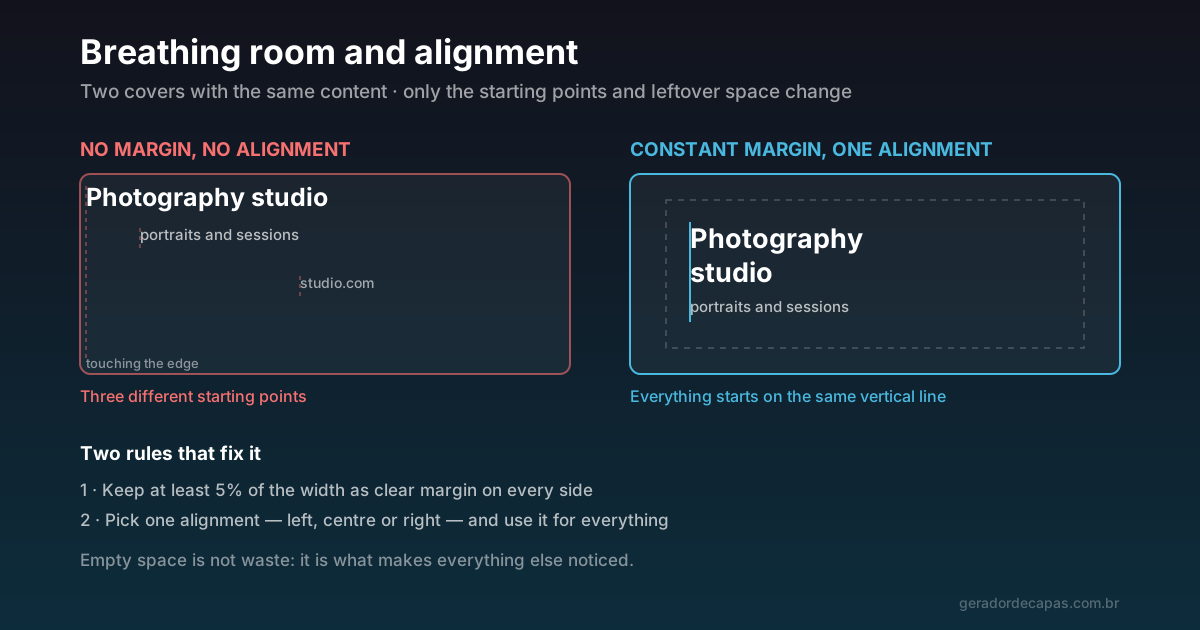
4. Breathing room at the edges
Reserve at least 5% of the width as clear margin on every side. Elements touching the border feel cramped and risk being cropped when the network trims the image on mobile.
Empty space is not waste: it is what makes everything else noticed.
5. One alignment only
Choose left, centre or right — and use the same one for everything. One line to the left, another centred and a third to the right produce disorder even when each element on its own is well made.
Alignment is what the eye uses to understand that elements belong to the same group.
6. Two typefaces at most
And if there are two, make them clearly different from each other. A single family varying bold and regular solves most cases with zero risk. Details in the best typefaces for covers.
7. Respect the avatar corner
On practically every network, the profile photo sits on top of the cover bottom-left corner. That corner is off limits for any information that needs to be read.
There is a useful consequence: because that corner is already taken, the composition naturally gains balance when the text moves to the opposite side. Aligning right is not only an aesthetic choice — in many formats, it is the only position genuinely left free.
8. Design for mobile
The cover is created on a large screen and seen on a small one. Before publishing, shrink the image to roughly the width of a phone and look from a distance. If the message is lost there, it will be lost for real.
It is also worth checking where each network crops the image, because the crop varies quite a bit between platforms.
9. Coherence with the rest of the brand
Same palette, same typography, same tone across every network. One isolated, polished cover is worth less than four consistent ones: recognition comes from repetition, not from occasional care.
10. Cut before publishing
Look at the finished cover and ask, element by element: if I remove this, does the message weaken? If the answer is no, remove it. Almost every cover improves after a round of subtraction.
What "converting" means on a cover
It is worth undoing a common expectation. A cover does not sell. Nobody sees a header and decides to buy. What a good cover does is different, and subtler: it reduces the friction of the next decision.
Whoever lands on your profile is running a quick triage — is it worth staying here? A clear cover answers three questions in that instant: what is this, is it for me, can I trust it. Answered, the person moves on to the bio, the posts, the link. Unanswered, they leave.
That is why "a cover that converts" almost never means a cover with a call to action. It means a cover that leaves no doubt. The mistake of filling the image with phone numbers and buttons comes precisely from the wrong expectation: trying to close a sale in a space whose job is only to qualify.
The practical implication is direct: between a beautiful cover and a clear one, choose clear. Between a clear one and one that is clear and beautiful, better still — but in that order.
How to apply all ten in five minutes
- Write the single message (tip 1).
- Open the maker and choose the network format.
- Set the message large and the support much smaller (tip 2).
- Choose a dark background with light text, or the reverse (tip 3).
- Push everything inward, leaving margin (tip 4), with one alignment (tip 5).
- Check the bottom-left corner (tip 7) and shrink the image to simulate mobile (tip 8).
- Cut whatever is dispensable (tip 10) and download.
Checklist
- Is there only one message?
- Is the hierarchy obvious?
- Does the text survive the squint test?
- Is there margin on every side?
- Does everything use the same alignment?
- Are there at most two typefaces?
- Is the avatar corner clear?
- Did you test at phone size?
- Is the palette the same as on your other networks?
- Is there anything left you could cut?
Ten questions, under two minutes. It is the cheapest filter there is between any old cover and one that works.
Frequently asked questions
What is the most important tip for a cover?
Settling on a single message. Covers that try to communicate several things at once communicate none, because whoever looks gives the image less than two seconds.
How much margin should I leave on a cover?
At least 5% of the width clear on each side, as a reference. Besides looking better, that slack protects the content when the network crops the image on smaller screens.
Should I centre the text or align it left?
Either works — what does not work is mixing them. Pick one alignment and apply it to every element. On covers where the bottom-left corner is taken by the avatar, aligning right is usually the best way out.
How do I test the cover before publishing?
Shrink the image to roughly the width of a phone and step back from the screen. After publishing, open the profile in the app rather than on desktop — that is where most people will see it.
Photo cover or solid colour cover?
Solid colour is safer, because it guarantees contrast and legibility with no extra work. A photo works well when it has broad, even areas for the text to sit on, or when you darken the text region.
Does a cover actually increase sales?
Not directly. Nobody buys because of a header. What a good cover does is reduce the friction of the next decision: it answers in an instant what the profile is, who it is for and whether it inspires trust. With those answered, people keep browsing instead of leaving.
Do I need a button or call to action on the cover?
Rarely worth it. The cover is not clickable on most networks, so a call to action there produces little and consumes the space that should be communicating clarity. Calls to action work better in the profile fields, where they are real links.
Apply these tips to your cover
Free, no sign-up, high-resolution download.