Social media cover sizes: the complete table
Updated on August 10, 2026 · 6 min read
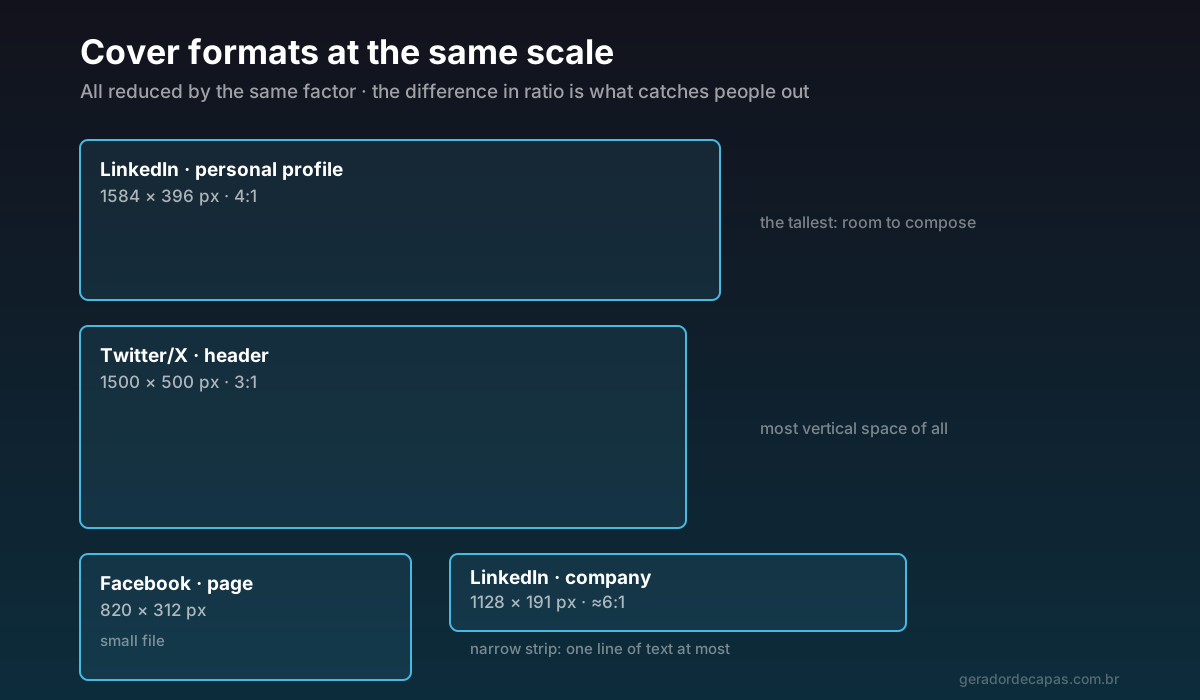
Every social network displays covers differently, crops them in a different place and hides part of them behind some piece of interface. Anyone trying to use the same image everywhere ends up with text sliced in half on at least one of them.
This page exists to settle that: current dimensions, the safe area of each format and the rules that apply everywhere. Bookmark it — it is reference material.
Dimensions table
| Network | Format | Size | Ratio |
|---|---|---|---|
| Page cover | 820 × 312 px | ≈ 2.6:1 | |
| Personal profile cover | 851 × 315 px | ≈ 2.7:1 | |
| Profile banner | 1584 × 396 px | 4:1 | |
| Company cover | 1128 × 191 px | ≈ 6:1 | |
| Twitter/X | Header | 1500 × 500 px | 3:1 |
| YouTube | Channel art | 2560 × 1440 px | 16:9 |
| Twitch | Profile banner | 1200 × 480 px | 2.5:1 |
Each network safe area
The correct size does not guarantee a correct cover. What actually shows is always smaller than the file you upload:
- Facebook (page): mobile crops about 90 px from each side. Count only on the central 640 px. The profile photo covers the bottom-left corner.
- LinkedIn (profile): keep what matters in the central band of roughly 1260 × 300 px. The profile photo extends well into the bottom-left corner.
- Twitter/X: the 3:1 ratio is preserved, so side cropping is minimal. The issue is the avatar in the bottom-left corner and the name and bio block right below.
- YouTube: the most extreme case. The file is 2560 × 1440 px, but only the central 1546 × 423 px region appears across all devices — from phone to television. Everything that matters goes there.
- Twitch: the avatar and channel information occupy the left. Concentrate content in the centre and to the right.
One rule cuts across all of them and saves a great deal of rework: important information lives in the centre. The edges are for breathing room, texture and colour.
Ratio matters more than pixels
If you take only one lesson from this page, take this one. A 1500 × 500 px image placed in a 4:1 space does not become smaller — it becomes cropped or stretched, because the shape does not match.
That is why reusing the same file across networks almost never works. What gets reused is the idea: the same palette, the same typeface, the same line, recomposed at each ratio. It takes work the first time and becomes routine afterwards.
What resolution to upload
Always upload at the stated size or a whole multiple of it — 2× is the most common. An X header at 3000 × 1000 px is visibly sharper on high-density screens than the same design at 1500 × 500 px.
The other direction is what ruins covers: building at 800 px wide and letting the platform enlarge. Enlarging does not invent detail, it only blurs what is there. If the photo you want is small, it is better to change photos than to stretch it.
JPG or PNG?
- JPG for photographic covers with many tones and gradients. The file is far smaller and the loss is imperceptible.
- PNG for covers with text, a logo, flat colours or crisp edges. JPG tends to create artefacts around letters; PNG keeps the edge clean.
When in doubt, look at what dominates the image: a photo calls for JPG, a graphic calls for PNG.
Step by step to get it right first time
- Identify the exact format in the table above. Pay particular attention to LinkedIn, which has different sizes for profile and company.
- Open the maker and choose the format. It already works at the correct ratio for Facebook, LinkedIn (company) and Twitter/X.
- Compose in the centre, respecting the network safe area.
- Leave the bottom-left corner clear — on practically every network, that is where the avatar or logo sits.
- Download at high resolution and check on a phone before calling it done.
How to adapt one cover across networks
The fastest way to keep a coherent presence on several networks is to work by adaptation, not repetition. The routine:
- Start with the tightest format you use — usually the LinkedIn company cover, at 191 px tall. If the message fits there, it fits anywhere. Starting from the largest and scaling down usually fails, because what was comfortable becomes cramped.
- Fix the elements that do not change: the palette, the type family and the line. Those three form the identity and should carry across every version untouched.
- Recompose the layout at each ratio. In the short format, everything on one line. On the X header, which is tall, you can stack a headline and a complement. On the LinkedIn banner, the text moves right to escape the profile photo.
- Scale the text proportionally rather than in fixed pixels. Type that occupies a fifth of the height works in any format; the same type at 40 px is enormous on a LinkedIn company cover and tiny on YouTube.
- Check each version on the device where it will mostly be seen.
Done carefully once, this set becomes a template. On future swaps you only replace the line and keep the structure — turning hours of work into minutes.
How often do the dimensions change?
Less than you would think. The main ratios have been stable for years: 3:1 on X, 4:1 on the LinkedIn banner, 16:9 on YouTube. What changes more often is the interface around them — avatar size, button positions, how much a phone screen crops.
So the safest strategy is not memorising numbers but designing with slack: information in the centre, generous margin, large text. A cover built that way survives layout changes without needing to be remade.
Frequently asked questions
What is the most common cover size?
It depends on the network: 820 × 312 px on a Facebook page, 1584 × 396 px on a LinkedIn profile banner, 1128 × 191 px on a LinkedIn company page and 1500 × 500 px on a Twitter/X header.
Can I use the same image on every network?
The same file, no — the ratios differ and the image would be cropped or stretched. What gets reused is the idea: same palette, same typography and same message, recomposed at each size.
What is a safe area?
It is the part of the cover visible on any device. Outside it, the image may be cropped on smaller screens or hidden behind the profile photo. On YouTube, for example, the file is 2560 × 1440 px but the safe area is only 1546 × 423 px.
Should I upload larger than the official size?
Yes, as long as you keep the ratio. Uploading at double the size (3000 × 1000 px for an X header, for instance) improves sharpness on high-density screens. What does not work is uploading smaller and letting the platform enlarge.
JPG or PNG for covers?
JPG for mostly photographic covers, because the file is much smaller with no perceptible loss. PNG for covers with text, a logo or flat colours, because it preserves crisp edges.
Create your cover at the right size
Free, no sign-up, high-resolution download.