The best typefaces for covers and how to pair them
Updated on August 10, 2026 · 6 min read
A typeface speaks before the text does. Before processing the words, whoever looks has already registered whether this seems serious, modern, handmade or improvised. It is a communication decision — but on a cover, it is first and foremost a technical one.
Because the context is unforgiving: the cover is seen small, quickly and almost always on a phone. That rules out a good share of beautiful typefaces from the start.
Legibility comes first
Before asking "which typeface matches my brand", ask "which typeface still reads in a band a few centimetres wide". The characteristics that survive that reduction:
- Consistent stroke weight. Typefaces with very thin sections lose those parts when reduced.
- Open apertures. Letters like "c", "e" and "s" need generous openings so they do not turn into blobs.
- Distinct letterforms. In some typefaces, capital "I", lowercase "l" and the numeral "1" are identical — a real problem in names and numbers.
- Comfortable spacing. Letters set too tightly clog up at small sizes.
Serif or sans serif?
Serifs are the small finishing strokes at the ends of letters. Choosing between the two groups communicates a fair amount:
| Type | Conveys | Good for |
|---|---|---|
| Sans serif | Clarity, modernity, straight to the point | Technology, services, general use |
| Serif | Tradition, authority, seriousness | Law, consulting, editorial |
| Script | Warmth, handmade | Short details, never the main text |
| Display | Strong personality | One word, at large size |
For covers, sans serif is the safest choice: it holds legibility at small sizes and carries no stylistic noise. Serifs work well when the cover has little text at large size — in small text, the serifs disappear and the typeface loses its point.
One typeface is enough
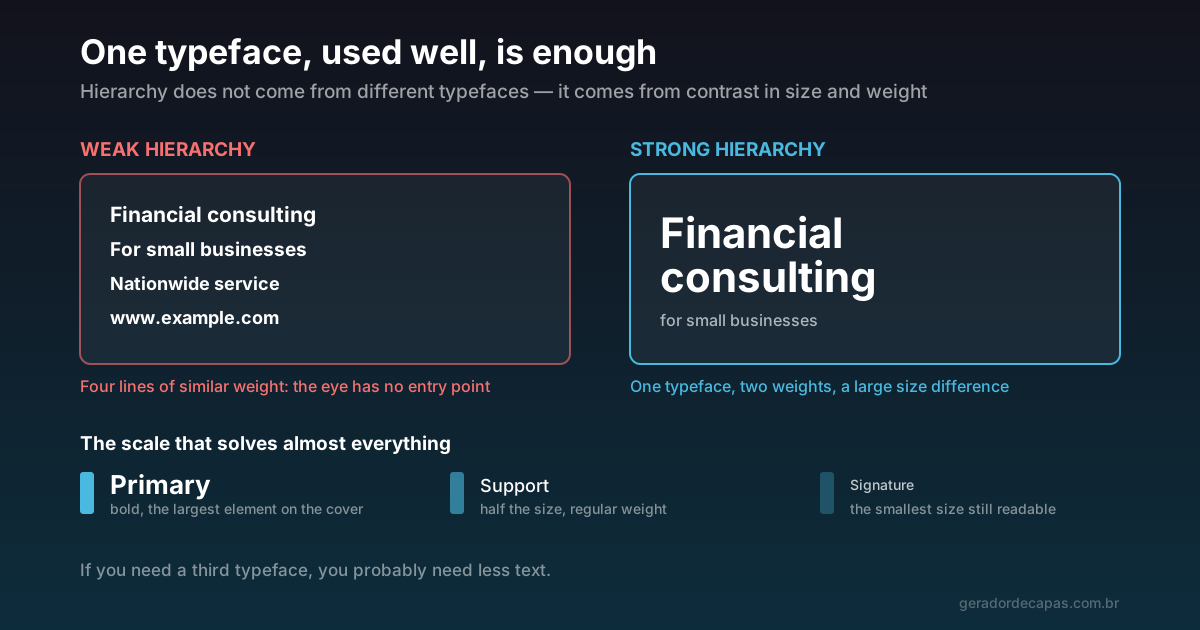
The most reliable way to get this right is to use a single type family varying the weight: bold for the main message, regular for support. That creates hierarchy with no risk of an unfortunate pairing.
If you want two, follow the principle of clear contrast: they must be obviously different, not similar. Two sans serifs of similar design read as a mistake — as though you picked the wrong font by accident. A serif with a sans serif, on the other hand, makes a comfortable pair.
Three typefaces on one cover is excess in practically every case.
Three pairings that rarely fail
- One sans serif, two weights. Bold for the primary, regular for support. The safest option and the one that holds up best in any format.
- Serif headline, sans serif support. Gives an editorial, serious air, with contrast coming from the nature of the typefaces themselves. Works well for consulting, law and education.
- Condensed sans headline, regular sans support. The difference in width creates the contrast. Useful when the line is long and space is short.
What unites all three is the same principle: the difference has to be obvious. Timid contrast reads as carelessness.
Hierarchy means a large difference
The most common mistake is not choosing the wrong typeface — it is using sizes that are too similar. Four lines at close sizes leave the eye with no entry point.
A scale that solves almost everything:
- Primary: bold, the largest element on the cover by a clear margin.
- Support: around half the size of the primary, regular weight.
- Signature: the smallest size still readable on a phone.
If two elements need the same prominence, one of them probably should not be on the cover.
What is the minimum size?
There is no universal number, because it depends on the cover dimensions. The useful criterion is proportional: the main text should occupy at least a tenth of the height of the image. On an X header, 500 px tall, that means somewhere around 50 px.
For the signature, the practical limit is the real test: shrink the cover to roughly the size it will have on a phone and try to read it. If you have to lean in, it is too small.
How to test a typeface before deciding
Choosing type by looking at its name in a catalogue tells you almost nothing. What reveals how a typeface actually behaves is testing it with your text at your size:
- Write the line that will actually go on the cover. A typeface can be excellent in "Lorem ipsum" and poor in your sentence, which may contain accents, numbers or an awkward letter sequence.
- Shrink to the apparent size on a phone. It is the only test that matters, because it is the real size of use.
- Check accented characters if your language uses them. Many free typefaces have incomplete support — the accent appears misplaced, collides with the letter, or simply vanishes.
- Test the numerals, if any appear on the cover. Some typefaces use old-style figures of varying height that look odd among capitals.
That test takes under a minute in the maker, since switching typefaces is instant and does not reload the page.
Where to find commercially licensed typefaces
Typefaces have licences, and using one outside its terms in company material is an unnecessary legal risk. The Google Fonts library covers most cases: free families for commercial use, with varied weights and good on-screen legibility.
The maker loads Google Fonts directly, so you can try several options without installing anything and without licensing worries.
Typefaces to avoid on covers
- Script faces for the main text. Beautiful at large size and unreadable at phone size.
- Very thin strokes. They vanish when reduced or on light backgrounds.
- All capitals in long phrases. Capitals remove the outline shape of words, which is what allows fast reading. In one or two words it works; in a sentence it hinders.
- Typefaces with too much personality for the sector. A playful display face on a law firm cover communicates the exact opposite of the intent.
Checklist
- Are there at most two typefaces?
- If there are two, do they clearly contrast?
- Does the main text occupy at least a tenth of the height?
- Is the size difference between primary and support obvious?
- Does the typeface stay readable when you shrink the cover?
- Does the licence allow commercial use?
With typography and palette settled, you have a standard ready to repeat across every network — which is exactly what builds recognition.
Frequently asked questions
What is the best typeface for a social media cover?
A sans serif with consistent stroke weight and open apertures, because it holds legibility when the cover is seen small on a phone. General-purpose families from Google Fonts cover most cases and are free for commercial use.
Can I use two typefaces on the same cover?
Yes, as long as they clearly contrast — a serif with a sans serif, for example. Two similar typefaces read as a mistake. When in doubt, use one and vary bold and regular.
What is the minimum font size for a cover?
Use a proportional criterion: the main text should occupy at least a tenth of the cover height. On a 500 px tall header, that is around 50 px.
Can I set everything in capitals?
In one or two words, yes. In whole sentences, no: capitals remove the characteristic outline of words, which is exactly what allows fast reading at a glance.
Do I have to pay for typefaces used on commercial covers?
Not necessarily. The Google Fonts library is free for commercial use and covers most needs. What you should not do is use paid or personal-licence typefaces in company material without checking the terms.
Try the typefaces in the maker
Free, no sign-up, high-resolution download.