A LinkedIn cover that attracts recruiters and clients
Updated on August 10, 2026 · 6 min read
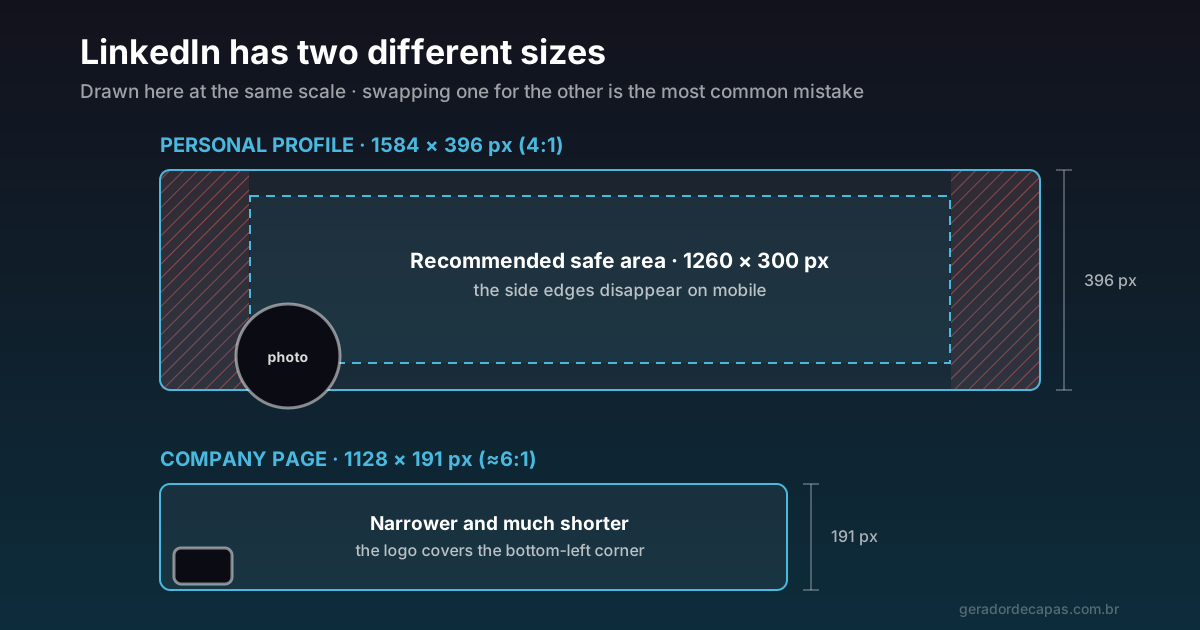
LinkedIn is the one place where recruiters, clients and partners will look you up on purpose. And on most profiles, the largest available piece of visual space is still occupied by that default blue background. Free space, guaranteed exposure, seen by everyone who opens your profile — wasted.
Before design, though, one confusion has to be cleared up, because it is why most LinkedIn covers start out wrong: the network uses two completely different sizes, and using one in place of the other is the most common mistake on the platform.
Two sizes, two purposes
| Where | Size | Ratio |
|---|---|---|
| Personal profile (banner) | 1584 × 396 px | 4:1 |
| Company page (cover) | 1128 × 191 px | ≈ 6:1 |
These formats have different personalities. The personal profile banner is reasonably tall and allows composition — it fits a line of text, a graphic element, even a photo. The company cover is a narrow strip: any attempt to compose much there ends up cramped.
If you upload a 1128 × 191 px image to a personal profile, LinkedIn will enlarge it to fill 1584 × 396 — and the result is that blurred band you have seen on dozens of profiles. Going the other way crops the image.
Where LinkedIn crops your image
Having the right size is not enough, because not all of the uploaded area is visible all the time:
- The sides disappear on mobile. A narrower screen reduces the visible width. As a rule of thumb, keep what matters within the central band of roughly 1260 × 300 px on the personal banner.
- The profile photo covers the bottom-left corner. It is large and circular, and it extends well into the banner. No text or logo in that corner.
- Your name and headline sit right below. Text pressed against the bottom of the banner competes with that information and muddies the reading.
On a company page, the logo occupies the bottom-left corner with the same logic. Since the strip is short, there is little vertical room: one well-placed line of text is usually the sensible limit.
What to write on a profile banner
The banner is not decoration: it is the only part of the profile where you control the first visual impression. Pick one of these angles:
- What you solve, and for whom. "I help manufacturers cut logistics costs" says more than any job title. Works especially well if you sell a service.
- Speciality plus credential. Combine your field with something verifiable: years of experience, a certification, an industry. Useful for anyone job-hunting.
- A discreet call to action. A website or a short invitation. Do not use an email address in small type — nobody types out what they read in an image.
- Company visual identity. If you represent a brand, aligning your banner with it reinforces coherence between profile and page.
Avoid generic motivational quotes. They take up the most valuable space on the profile without telling anyone anything about you.
Company pages need a different strategy
On a personal profile, visitors already know they will find a person: the banner complements a face and a name. On a company page, the cover works more like a storefront — it has to say plainly what kind of organisation this is.
Since the format is a short strip, only 191 px tall, vertical compositions do not work. What does work:
- A background in the brand colour with the sector in one line. Simple, readable and instantly recognisable.
- A graphic pattern drawn from the visual identity, with no text at all, leaving the communicating to the page name and description.
- A short institutional line, placed to the right so it does not fight the logo.
What does not work: detailed photos (they become an illegible band), lists of services, and any text longer than half a dozen words.
Coherence between the two
If you represent your own company, it pays to align both pieces: same palette, same type family, same tone. Someone leaving your profile and landing on the company page should feel they are in the same place. That continuity is cheap to produce and makes a real difference to how solid you look.
Step by step
- Pick the right format for your case: profile banner or company cover. That decision comes before everything else.
- Open the maker and select the LinkedIn format.
- Write one line only. If it does not fit comfortably, it is too long for the format.
- Place the text to the right or centre, leaving the bottom-left corner clear for the profile photo.
- Apply your brand colours or a restrained palette. LinkedIn is a professional context: high contrast, little noise.
- Download at high resolution, publish and check on mobile. That is where most visits happen.
Mistakes that cost credibility
- A stretched banner because it was made at the wrong size — the most visible sign of carelessness.
- Text behind the profile photo, sliced in half.
- Too much information: phone, email, website and tagline competing inside a 396 px strip.
- A generic stock image unrelated to your field. It says nothing and occupies prime space.
- Weak contrast, with light text on a light background.
Checklist before publishing
- Does the size match the page type (1584 × 396 for profile, 1128 × 191 for company)?
- Is the essential text in the central band?
- Is the bottom-left corner clear?
- Is the line specific about what you do?
- Is it effortless to read on mobile?
- Do the colours match the rest of your professional presence?
One practical note: the maker currently works at the company page format (1128 × 191 px). For a personal profile banner, use an image at 1584 × 396 px following the same composition rules from this guide.
Once LinkedIn is sorted, the next step is making your other networks speak the same language — that is what the guide on consistent visual identity is about.
Frequently asked questions
What is the LinkedIn cover size?
It depends on the page type. A personal profile banner uses 1584 × 396 pixels (4:1 ratio). A company page cover uses 1128 × 191 pixels (about 6:1). They are different formats and should not be swapped.
Why is my LinkedIn banner blurry?
Almost always because the image was created smaller than 1584 × 396 px and LinkedIn had to enlarge it. Rebuild the file at the correct size rather than stretching what you have.
What must stay out of the bottom-left corner?
Anything that needs to be read. The profile photo (or the logo, on a company page) sits on top of that corner and hides part of the image on every device.
Can I put my email and phone on the banner?
Technically yes, but it returns little: nobody types out a contact detail read inside an image. Use the space to say what you do and leave contacts in the profile fields, where they are clickable.
What is the safe area on a profile banner?
As a rule of thumb, keep text and logo within the central band of roughly 1260 × 300 px, because the side edges get cropped on smaller screens.
Create your LinkedIn cover
Free, no sign-up, high-resolution download.