Twitter/X header: size, safe zones and composition ideas
Updated on August 10, 2026 · 6 min read
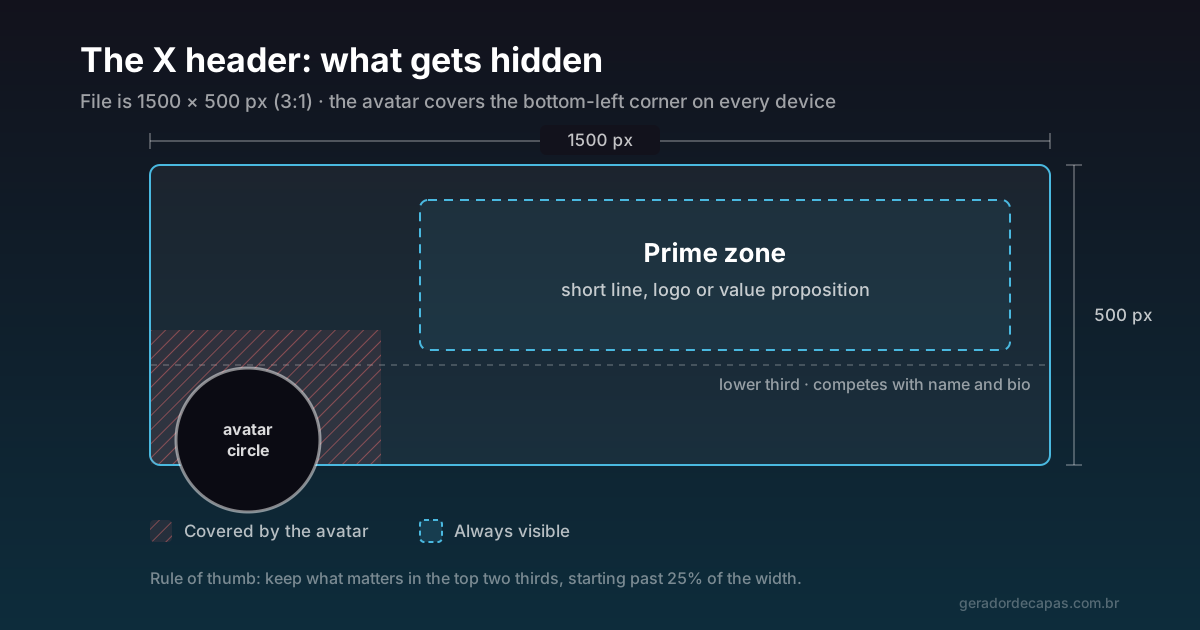
Among social media cover formats, the X header is the most generous. Where a LinkedIn company cover comes down to a 191 px strip, here you have 500 px to work with. That changes what is possible: you can genuinely compose, rather than just fit a line of text somewhere.
That freedom is also a trap. Because a lot fits, it is tempting to put a lot in — and the header is precisely the element people look at for the shortest time, while scrolling towards the posts.
The correct size
The X header uses 1500 × 500 pixels, a 3:1 ratio. Upload at exactly that size or a multiple of it (3000 × 1000 px, for example). Uploading something smaller forces the platform to enlarge it, and the result is the blurred look that gives away amateur work on a profile you may well use professionally.
The 3:1 ratio is preserved on both mobile and desktop, so the header does not suffer the aggressive side crop that happens on a Facebook cover. What changes between devices is apparent size — which is why small text is the enemy here.
What gets hidden
The avatar covers the bottom-left corner
The circular profile photo sits on top of the header in the bottom-left corner, and it is large. It takes up a considerable area — in practice, the first quarter of the width, across the lower half, is compromised. A logo, a tagline or any information there will show up half-covered.
The lower third competes for attention
Directly below the header come your name, handle, bio and buttons. Text pressed against the bottom of the header visually conflicts with that block: two layers of type almost touching, and the reading gets confusing.
Adding both constraints, the genuinely prime area is the central and upper band, starting from roughly 25% of the width. That is where the message belongs.
Four compositions that work
- Minimal. A solid brand colour and one short line aligned to the right. The hardest option to get wrong and the one that survives small screens best.
- Value proposition. One line saying what you do, with a discreet logo in the top-right corner. Ideal for professional profiles and company accounts.
- Campaign. A launch, an event, a date. The header is excellent for this because it is large and appears before any post — but it demands the discipline to swap it when the campaign ends.
- Brand texture. A graphic pattern, gradient or texture with no text at all. Works when the profile name and bio already explain everything and you only want identity reinforcement.
Composition best practices
- Little text. The header is scenery, not reading material. One line. If you need two, you probably need half of one.
- High contrast. If there is a photo behind, darken the text region or use a solid band behind it. Light text on a light image is unreadable at any size.
- Coherence with the avatar. Header and profile photo always appear together. If one is colourful and busy and so is the other, they fight. One leads, the other follows.
- Room at the edges. Leave a generous inner margin. Elements touching the border feel cramped and are at risk in any future crop.
- A sharp file. Always 1500 × 500 px or larger, never smaller.
The mistakes that show up most
Text running edge to edge
Because the header is wide, there is a temptation to stretch the line across the whole span. The eye does not read that way: on a very long line, it loses the return point. Keep text in a block of moderate width, with generous margin on both sides.
A background photo with too much detail
A landscape full of small elements turns into noise when reduced to header height on a phone. Photos with broad, even areas — sky, a wall, a smooth surface — work far better because they leave room for the text to breathe.
Header and avatar competing
If the avatar is colourful and busy, the header has to step back. Two elements fighting for attention in the same corner of the screen means neither gets noticed.
The eternal campaign
A header announcing an event that already happened is worse than a generic one: it signals neglect. If you use the space for a campaign, put the swap date in your calendar.
How to test before publishing
Two quick tests avoid nearly all rework. The first is the squint test: narrow your eyes until the image blurs. Whatever stays readable is what people will catch at a glance — if the text vanishes, it lacks contrast or size.
The second is the thumb test: shrink the image to roughly the width of a phone on your desktop screen and step back a little. That is how most people will see your header. If the message is lost at that size, it will be lost for real.
Checklist before publishing
- Is the image 1500 × 500 px (or a multiple)?
- Is the bottom-left corner clear for the avatar?
- Is the text above the lower third?
- Can you read it on a phone without zooming?
- Do the header and avatar look like they belong to the same profile?
- If it is a campaign, do you know when you will replace it?
If you want to apply the same identity to other networks without starting from scratch, the route is in the cover size guide: same idea, different ratios.
Frequently asked questions
What is the Twitter/X header size?
1500 × 500 pixels, a 3:1 ratio. You can upload a multiple of that, such as 3000 × 1000 px, to guarantee sharpness on high-density screens.
Why does my header look cropped?
The 3:1 ratio is preserved across screens, so side cropping is minimal. What usually looks like cropping is the profile photo covering the bottom-left corner, or text pressed against the bottom competing with your name and bio.
Can I use the same image on my X header and Facebook cover?
The idea yes, the file no. The ratios differ (3:1 against about 2.6:1) and reusing directly stretches or crops the image. Rebuild the composition at each size, keeping colours, typeface and message.
Where is the best place for text on a header?
In the central and upper band, starting from roughly 25% of the width. That avoids both the avatar in the bottom-left corner and the visual conflict with your name and bio directly below.
Do I need a logo on the header?
Not necessarily. The avatar is usually the logo already, so repeating it can be redundant. If you do use one, keep it discreet and far from the bottom-left corner.
Build your X header
Free, no sign-up, high-resolution download.